Download Card Lifeboat, free.
One app for Mac and Windows. Scan, preview and save 10 files free; a $29 key saves the rest. Install it on your computer, never on the card you want to recover.
Free to scan, preview and save 10 files. $29 once to save the rest. Not a subscription.
Or buy Card Lifeboat now forBuy for $29 once
macOS 12 or later, or Windows 64-bit.
Never writes to the card. 30-day refund, no conditions.
macOS 12 or later, or Windows 64-bit. Intel Mac? Get the Intel version (15.8 MB).
On Windows, Card Lifeboat has so far been tested scanning card image files. Reading a card directly on Windows is still being tested.
On your phone? Card Lifeboat runs on a Mac or a PC.
Pick your computer
Mac with Apple silicon
macOS 12 Monterey or later, on Apple silicon or Intel.
CardLifeboat-0.1.4-arm64.dmg, 15.4 MB. Signed and notarized by Apple.
Download for Apple silicon MacsMac with an Intel processor
macOS 12 Monterey or later, on Apple silicon or Intel.
CardLifeboat-0.1.4-x86_64.dmg, 15.8 MB. Signed and notarized by Apple.
Download for Intel MacsWindows
Windows, 64-bit (x64).
CardLifeboat-0.1.4-x64-setup.exe, 35.0 MB. Signed by Kerr & Company LLC.
On Windows, Card Lifeboat has so far been tested scanning card image files. Reading a card directly on Windows is still being tested.
Download for WindowsChecking the download
On a Mac, macOS checks Apple’s notarization when you first open the app. On Windows, right-click the installer, choose Properties, then Digital Signatures, and look for Kerr & Company LLC. To compare checksums, run shasum -a 256 on a Mac or Get-FileHash in PowerShell:
| File | Bytes | SHA-256 |
|---|---|---|
| CardLifeboat-0.1.4-arm64.dmg | 15,353,362 | 8c6c78ce30edc16a3e32e9e44ef8bc6bfd4cfaded20a763381124e42e4c39867 |
| CardLifeboat-0.1.4-x86_64.dmg | 15,848,181 | bceff3bb8b543d571703f71e53c4f0b63becd2c396e5f72ab8235a64e2c1f267 |
| CardLifeboat-0.1.4-x64-setup.exe | 35,034,304 | 312993d9811ca5d871711464fb8623122fb32021e7544dd5b2fb62c27f91321f |
First launch
- Stop using the card. Take it out of the camera or phone, and do not format or repair it.
- Open the file you downloaded and install Card Lifeboat on your computer. On a Mac, drag it into Applications.
- Open Card Lifeboat, connect the card through a card reader and choose it, then pick a folder on another drive with the card’s size plus 10% free. On a Mac, macOS asks your permission in its own box before the card is opened read-only.
What happens to your data
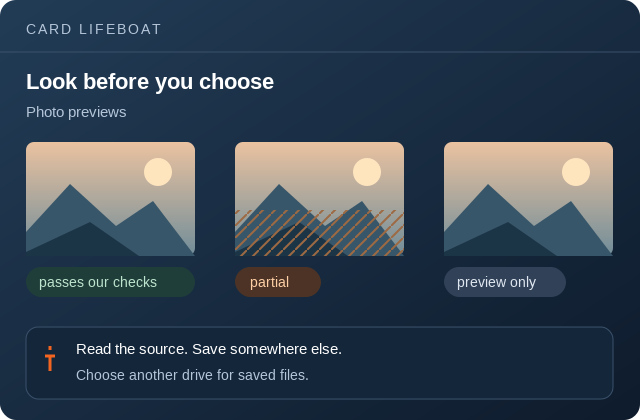
Everything happens on your computer. Card Lifeboat copies the card, read-only, into an image file in a folder you choose on another drive (it needs the card’s size plus 10% free), then scans that copy. Previews stay in a temporary folder on your computer. The files you save go into a dated Card Lifeboat folder on the drive you pick, and the card image stays where you put it until you move it to the Trash or Recycle Bin. Nothing from the card is uploaded. Windows itself adds a small System Volume Information folder and similar bookkeeping to any card you connect, before any app opens it. That is Windows, not Card Lifeboat. The app sends no usage counts. Privacy.
What it costs over time
Disk Drill’s One-Year Subscription is $89 per year and “Renews yearly” (cleverfiles.com/pro.html, read 23 November 2026, 21:32 UTC).
Download questions
Which Mac download do I need?
Apple menu, then About This Mac. If it says Chip and an Apple M name, get the Apple silicon version. If it says Processor and Intel, get the Intel version.
Is the download the full app?
Yes. There is one app. The free version scans, previews and saves 10 files; a licence key turns the same app into Pro.
Do I need an account?
No. There is no account. Buying gives you a licence key by email, and the key is kept on your own computer.
Will installing it change my card?
No. Install it on your computer, never on the card. Card Lifeboat opens the card read-only and saves to another drive.
Does it work offline?
Scanning, previews and saving work offline. Activating a key needs the internet, and the app checks the key about once a day when it can.
How do I check the file is genuine?
The Mac downloads are signed and notarized by Apple, and the Windows installer is signed by Kerr & Company LLC. You can also compare the SHA-256 checksums listed on this page.